
On this page→
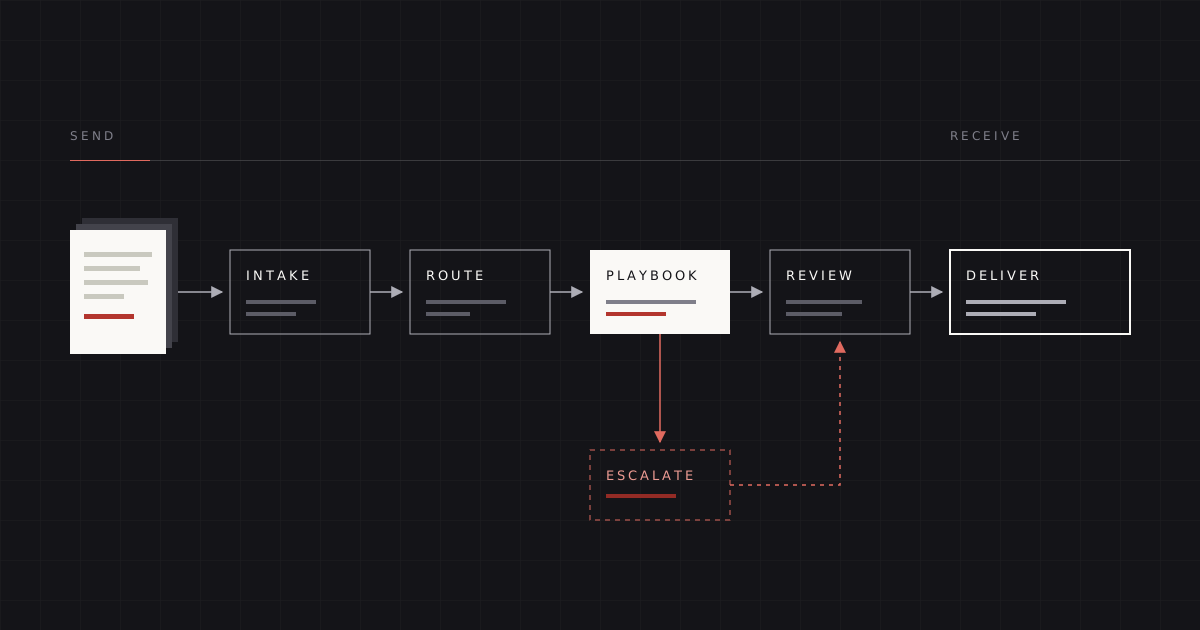
Contracts do not stall because the law is hard. They stall in the gaps: the agreement sitting in someone's inbox, the redline waiting for a reply nobody knows is owed, the signature request sent to the wrong person. A contract pipeline is the set of rules and tools that closes those gaps, so every agreement has an owner, a next step, and a visible status from the moment it arrives until it is signed.
For most growing companies the right place to run that pipeline is the place people already work. For many teams, that is Slack. This is a how-to for building one, written from the operator's side: what to design first, what to automate, what a lawyer must touch, and how to tell whether it is working.
Start with the map, not the tool
Before building anything, write down how a contract moves today. Who sends it? Where does it land? Who decides it needs a lawyer? Who signs? You will almost always find the same three problems:
- Multiple front doors. Sales emails the GC, procurement uses a shared inbox, a founder forwards a PDF from their phone.
- Invisible state. Nobody can say, without asking, which agreements are waiting and on whom.
- Undefined authority. Reviewers are not sure what they can concede without asking, so they ask about everything.
A pipeline fixes these in order: one front door, visible state, written authority. The tooling is the easy part.
Intake: one front door with the right fields
Intake is where most pipelines succeed or fail. If the request arrives without the information a reviewer needs, the first step of every review is a round of questions.
Create a single channel (for example, #contracts) and a short form, using Slack's Workflow Builder or a similar tool, that posts each request as its own message. The thread under that message becomes the record for that agreement. Ask for:
- Document type, from a fixed list: NDA, MSA, order form, DPA, SOW, vendor agreement, other.
- Whose paper: ours or theirs. This is the single biggest driver of effort.
- Counterparty name and the internal deal owner.
- Deal context: value or tier, and anything unusual (a strategic logo, a regulated customer, a pilot).
- Target date, and whether it is real or aspirational.
- The file itself, or a link to it in your document system.
Resist adding more. Every extra field lowers the chance people use the form instead of messaging a lawyer directly, which recreates the problem you set out to fix.
Routing: rules a machine can apply
Once a request arrives, something must decide where it goes. Write routing rules simple enough that a workflow can apply them without judgment:
- Our paper, standard template, no edits requested → self-serve. The deal owner sends it for signature.
- Our paper, counterparty edits → playbook review.
- Their paper, NDA → playbook review, fast lane.
- Their paper, anything else → full review.
- Any document flagged as strategic, regulated, or above a value threshold → full review with a named decision-maker copied from the start.
Post the routing result into the thread so everyone can see it, and set a status, either with a reaction emoji convention (for example 👀 in review, ✍️ redline sent, ⏳ waiting on counterparty, ✅ signed) or with a status field in a connected tracker. The convention matters less than everyone using the same one.
Thresholds: write down what reviewers may decide
The playbook is the most important artifact in the pipeline. It turns your preferences into positions a reviewer can apply, and it defines exactly when an issue leaves the reviewer's hands. Our article on what to negotiate in NDAs, MSAs, and DPAs covers the substance. Here is what the operational side can look like when you write those thresholds down as configuration.
# Illustrative only. Not a recommendation for any specific company.
document: msa
paper: counterparty
clauses:
  limitation_of_liability:
    preferred: "Mutual cap at 12 months of fees paid or payable"
    fallback: "Mutual cap at 6 months; confidentiality and data breach carved out"
    escalate_when:
      - cap_months_below: 6
      - uncapped_liability_on: us
      - removes_carveout: confidentiality
    escalate_to: ["deal_owner", "finance_lead"]
  indemnity:
    preferred: "Provider IP indemnity only"
    fallback: "Add mutual third-party claims for gross negligence"
    escalate_when:
      - one_way_indemnity_from: us
      - covers_indemnitee_own_negligence: true
    escalate_to: ["general_counsel"]
  payment_terms:
    preferred: "Net 30"
    fallback: "Net 45"
    escalate_when:
      - net_days_above: 45
    escalate_to: ["finance_lead"]
routing:
  deal_value_full_review_above: "[set by finance]"
  strategic_accounts: "[list maintained by revenue lead]"
A configuration like this does not run itself. Its value is that it makes three things explicit: what the reviewer should ask for, what they may accept without asking, and who decides the rest. Whether it lives in YAML, a spreadsheet, or a CLM's playbook module matters far less than whether it is written down and current.
Automate the logistics, not the judgment
The temptation with any pipeline is to automate everything. Resist it. A useful rule: automate anything that moves information; keep a qualified person on anything that changes legal position.
Good candidates for automation
- Creating the intake record and thread from the form.
- Applying routing rules and setting initial status.
- Generating our-paper agreements from templates with deal fields filled in.
- First-pass comparison of counterparty paper against the playbook, flagging clauses that deviate.
- Drafting a proposed redline and issues table for a reviewer to check.
- Reminders when an agreement has sat in one status too long.
- Sending for signature once the final version is approved, and filing the executed copy.
What an attorney must touch
- Every outbound redline and issues table before it goes to the counterparty.
- Any clause the playbook does not cover, or any deviation beyond a fallback.
- Escalation summaries for decision-makers, so the risk is described accurately.
- Changes to the playbook itself.
AI-assisted drafting belongs in the first list, as a way to produce the first draft faster, and never as a substitute for the review in the second. A pipeline where AI output reaches a counterparty unreviewed is not faster; it is riskier, and the risk shows up later.
Integrations: connect the systems that already hold the facts
A pipeline in Slack is the front end. The facts live elsewhere, and the pipeline is most useful when it reads from and writes to those systems instead of asking people to copy information between them.
- CRM (Salesforce, HubSpot). Trigger an intake request when a deal reaches a defined stage, pre-filled with the counterparty, deal owner, and value. Write the agreement status back to the opportunity so revenue leaders see legal status alongside deal status.
- E-signature (DocuSign or similar). Send the approved final version for signature from the thread, and use the signature platform's completion notifications to update status and file the executed agreement automatically.
- CLM or document system (Ironclad, Google Drive, SharePoint). Store the record of truth: every version, the executed copy, and key metadata like renewal dates. The Slack thread links to it.
- Work tracker (Jira, Asana). Useful when legal requests compete with other work, or when you want a queue view across all open agreements.
Build integrations one at a time, starting with the one that removes the most manual copying. For most teams, that is CRM-triggered intake or signature-triggered filing.
Measure the pipeline
You cannot improve what you do not measure, and you do not need a data team to measure a contract pipeline. Track four things per agreement:
- Cycle time by stage. Time from intake to first response, time in review, time waiting on the counterparty, time from final version to signature. Total cycle time hides where the delay is; stage times show it. Often the largest share is waiting on the other side, which is a sales problem, not a legal one.
- Escalation rate. The share of agreements that needed a decision outside the playbook. A high rate means the playbook is too narrow or out of date. A rate near zero may mean reviewers are conceding more than they should.
- Rework. How often a redline is sent back internally for correction before it goes out, or how often a signed agreement turns out to contain a term nobody intended. Rework is the best single signal of quality.
- Volume by type and paper. How many of each document type arrive, and how many are on counterparty paper. This drives staffing, template investment, and fee planning.
Report these monthly, by document type. Resist the urge to set targets before you have a baseline; the first month of data is usually more surprising than useful.
Common failure modes
These are the patterns that most often cause a pipeline to quietly fall apart:
- The side door stays open. Executives keep messaging the lawyer directly, and the lawyer keeps answering. Close the side door politely and consistently: "Can you drop that in
#contractsso it's tracked?" - The playbook is a one-time document. Positions drift as the business changes, the playbook does not, and reviewers stop trusting it. Review it quarterly against the escalation log.
- Too many statuses. Eight statuses that people do not update are worse than four they do.
- Automation without an owner. A workflow breaks when a field is renamed in the CRM, and nobody notices for weeks. Every automation needs a named owner.
- Measuring only total time. It produces pressure on reviewers for delays that are actually counterparty or internal-approval delays.
- No one owns the counterparty follow-up. Agreements sit in "waiting on counterparty" indefinitely. Make the deal owner responsible for that stage, with a reminder after a set number of days.
Where to start this week
You do not need to build everything at once. A useful first version takes three steps:
- Create the channel and the intake form with the six fields above.
- Agree on four statuses and who updates them.
- Write the playbook for the one document type you see most, usually the NDA.
Run that for a month, measure cycle time by stage, and then decide what to automate next.
If you want help designing the playbook, wiring the integrations, or running the pipeline once it is built, that is what our Contract Systems service is for, and Commercial Contracts is how we handle the agreements with you. Either way, the first step is a short conversation: talk to a lawyer.
Founder of Applied Legal. Former General Counsel at technology companies, software engineer, and Texas-licensed attorney who builds and runs contract pipelines. Read the full bio →
This article is general information, not legal advice, and reading it does not create an attorney-client relationship. Applied Legal is a trade name of Archuleta Partners PLLC. Responsible attorney: EJ Archuleta.